

Back to article
3348
Utilizzando i pulsanti e i comandi tattili
Le cuffie sono dotate di comandi touch e pulsanti fisici. Per utilizzare il controllo touch, toccare la superficie touch sulle cuffie o far scorre il dito nella direzione desiderata. Il controllo touch consente di riprodurre o mettere in pausa l'audio, utilizzare la funzione Salto in avanti o all'indietro, regolare il volume e utilizzare le funzioni di base per le chiamate. I pulsanti hanno funzioni predefinite, come i livelli di riduzione del rumore e l'assistente vocale, ma possono anche essere personalizzati nell'app Bose.
Using the buttons and touch controls | Bose QuietComfort Ultra Headphones (2nd Gen)
Headphone controls
The Multi-function button controls media playback. The volume strip controls the volume.
The Multi-function button controls phone calls. There are four microphones for phone calls on the headphones — two on the left earcup and two on the right earcup.
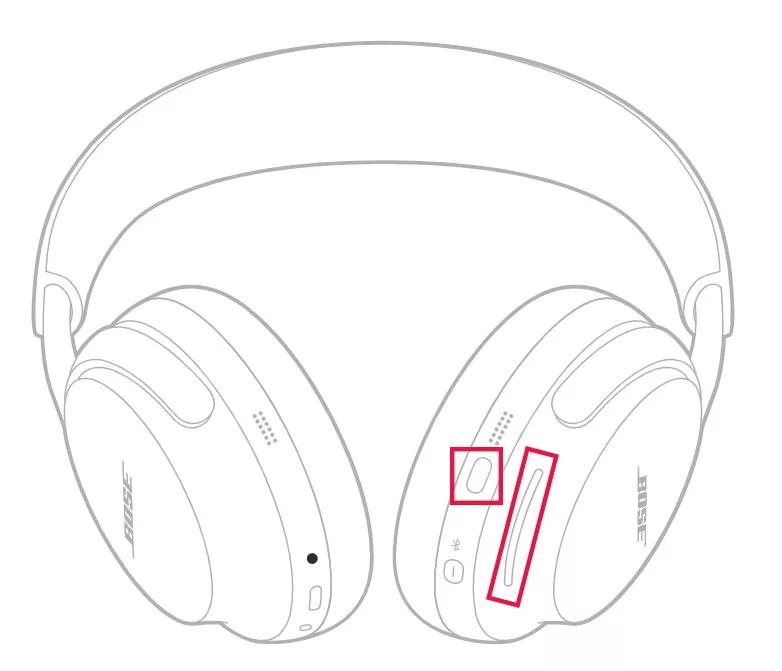
Media playback and volume
| Function | Headphones operation |
|---|---|
| Play or pause | Press the Multi-function button |
| Skip forward | Double-press the Multi-function button |
| Skip backward | Triple-press the Multi-function button |
| Volume up | Swipe up on the volume strip |
| Volume down | Swipe down on the volume strip |
Phone calls
The Multi-function button controls phone calls. There are four microphones for phone calls on the headphones — two on the left earcup and two on the right earcup.| Function | Headphones operation |
|---|---|
| Answer or end a call | Press the Multi-function button |
| End/Decline an incoming call | Double-press the Multi-function button |
| Answer second call and place the current call on hold | While on a call and a second incoming call is ringing, press the Multi-function button |
| Decline a second call and stay on the current call | While on a call and a second incoming call is ringing, double-press the Multi-function button |
Ripristino del prodotto | cuffie Bose QuietComfort Ultra (2a generazione)
Riavvia le cuffie.
Questo ripristino non cancellerà le impostazioni del prodotto.
- Se il cavo di ricarica USB o il cavo audio è collegato alle cuffie, scollegarlo.
- Collegare un cavo di ricarica USB e un caricatore a una presa di corrente. È anche possibile collegare il cavo USB a una porta USB di un computer acceso.
Nota: Non collegare ancora le cuffie al cavo USB. - Sulle cuffie, tieni premuto il pulsante di accensione/Bluetooth®.
- Mentre tieni premuto il pulsante, collega il cavo USB al padiglione destro. La spia di accensione delle cuffie lampeggerà rapidamente due volte.
- Una volta effettuata la connessione, attendi due secondi e rilascia il pulsante di accensione/Bluetooth.
Suggerimento: Se le cuffie non rispondono, reimpostale una seconda volta.
Questo articolo è stato utile?
Grazie per il feedback.